
Time Tracking
Time tracking is one of our key features, allowing accurate records of time spent working by Field Staff.
By default, when a Field Staff member completes a Visit then they are shown the precise times that TrackTrade has recorded, that is:
Travel Time: From when the contractor hit Start Travel and accepted the Job to when they hit Arrived On Site.
Site Time: From when the contractor declared they were on site to when they chose to complete the Visit.
The contractor can optionally amend these numbers before closing the Visit to make sure they are accurate.
Once they are happy then they can declare the Visit done and these hours are then forwarded to the Timesheet section of the Job.
There are a few adjustments that can be made in the Settings area. To see the Time Tracking settings, head to Settings > Job > Time Tracking.
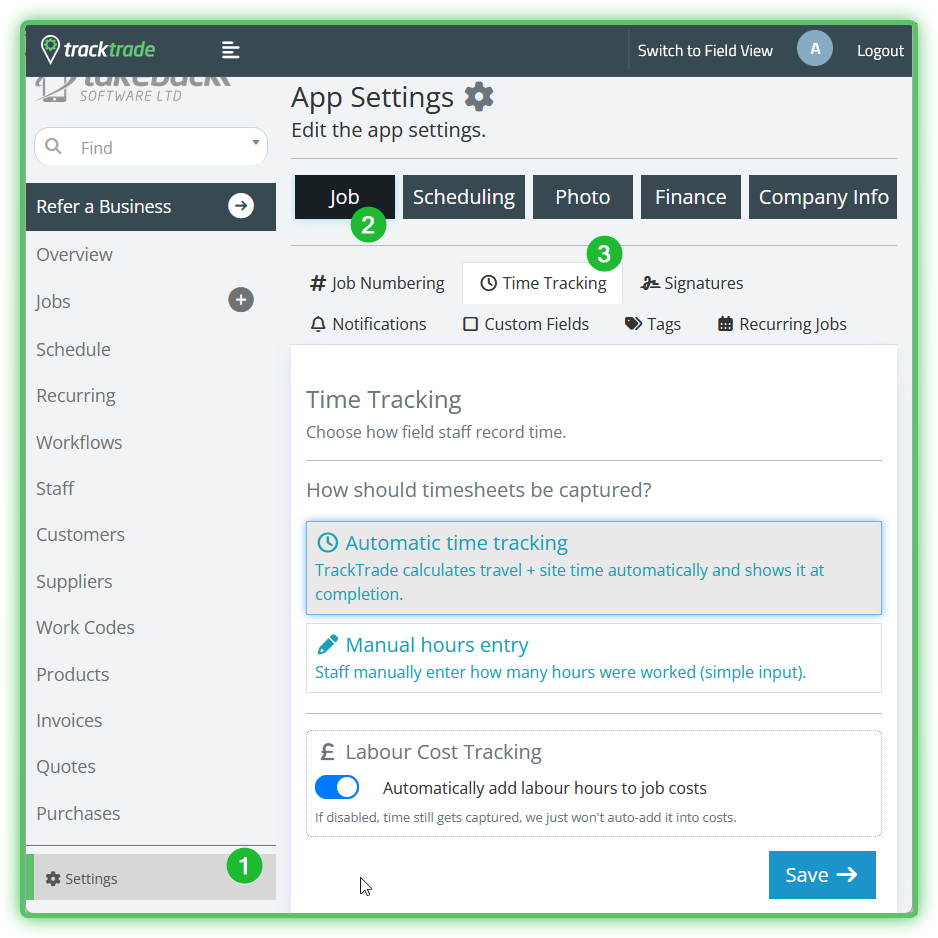
Automatic Tracking
This is the default, where we log the hours spent travelling and on site automatically.
Manual Tracking
A simpler mode where nothing is tracked by default and hours must be entered manually by Field Staff before ending their Visit or by Office Staff after the fact. This may be a more straightforward option for your workflow.
Labour Cost Tracking
Defaults to on. With this feature we automatically take the hours recorded on a Visit and forward it to the Jobs > Finance > Costs section on top of just recording it in the Jobs > Timesheet area. Depending on your financial workflow, you may wish to disable this in which case you should only see the hours on the Timesheet.